What makes an alarm sound work
- Contrast. A sound that stands out from the room, like a sharp buzz in a quiet bedroom, is noticed faster than one that blends in with a fan or traffic.
- Novelty. Your brain filters out sounds it hears every day. An alarm tone you've used for a year can stop registering as urgent.
- Pitch and texture. Harsh, buzzing or high-pitched sounds feel more urgent than soft, low ones, which is why sirens and buzzers are hard to ignore.
- Volume. Obvious, but often the problem: a phone on low alarm volume, face-down or under a pillow is much quieter than you think.
Gentle or loud: which should you use?
If you usually wake on the first alarm, start gentle. Melodic tones like piano, guitar or birdsong are a calmer way into the day, and some research suggests people feel less groggy waking to a melody than to a harsh beep.
If you sleep through alarms, gentle tones are a gamble. Use a loud one, and accept a less pleasant first ten seconds in exchange for actually getting up.
The best alarm sound for your type of sleeper
Light sleepers
Piano, guitar, birdsong or a soft ambient tone. Enough to wake you without a jolt.
Average sleepers
A melodic tone with a clear beat, or a gentle tone on the first alarm and a louder one on the backup.
Heavy sleepers
Harsh or unusual sounds: a buzzer, a rooster, a crying baby or a chaotic noise. The less pleasant, the harder to sleep through.
Sharing a room
A moderate tone plus vibration, with the phone close to you, so it reaches you before it reaches everyone else.
Change your alarm sound now and then
If you've started sleeping through an alarm that used to work, the sound may be the problem. Switching to a different tone every few weeks keeps your brain from filtering it out. Using different sounds for different alarms helps too, like a gentle weekend tone and a loud one for early weekdays.
Test it before you trust it
Play the tone at the volume you'll actually sleep with, from where your phone actually sits at night. Check that silent mode, Do Not Disturb or a battery saver won't mute or delay the alarm, and use an alarm app that rings on the alarm channel and shows over the lock screen.
Alarm sounds in Wekup
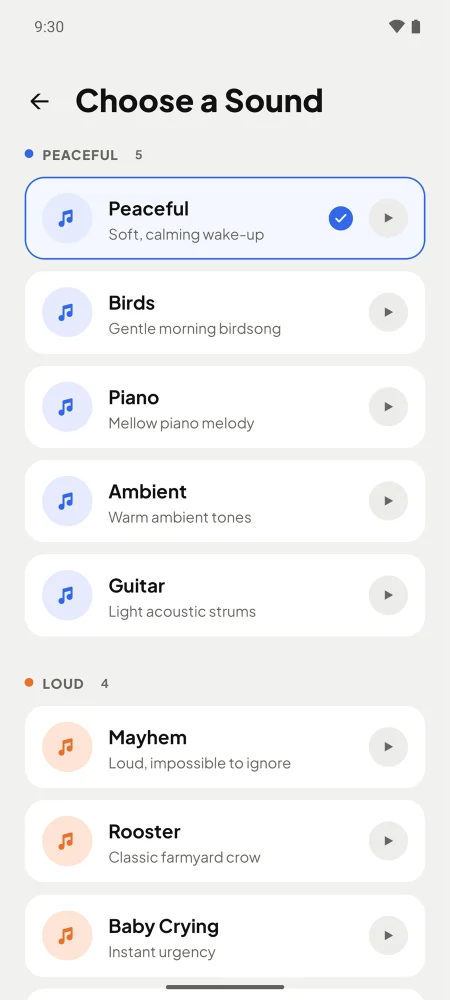
Wekup has nine alarm sounds in two sets. Peaceful: Peaceful, Birds, Piano, Ambient and Guitar. Loud: Mayhem, Rooster, Baby Crying and Buzzer. Tap the play button to preview each one, and give every alarm its own sound.
The phone also vibrates while the alarm rings. And because the sound is only half the problem, a Wekup alarm can have a mission: no snooze or dismiss button until you've done push-ups, solved three math problems, photographed an item or read a verse or affirmation aloud.
Why the sound alone isn't enough
Even the loudest alarm only has to wake you for the second it takes to switch it off. Heavy sleepers often silence an alarm half-asleep and remember nothing. Pair a sound that gets through with an alarm that needs real attention to turn off, and you're up for good.
By the Wekup team · Updated November 16, 2026