Skip to content
Wake up app

A wake up app that makes you get up

Most wake up apps rely on willpower. Wekup does not: when the alarm rings there is no snooze, so you finish a short mission and you are awake.

Get it onGoogle PlayComing soonApp Store

It is built for heavy sleepers, early starts and anyone who has turned off an alarm without remembering it.

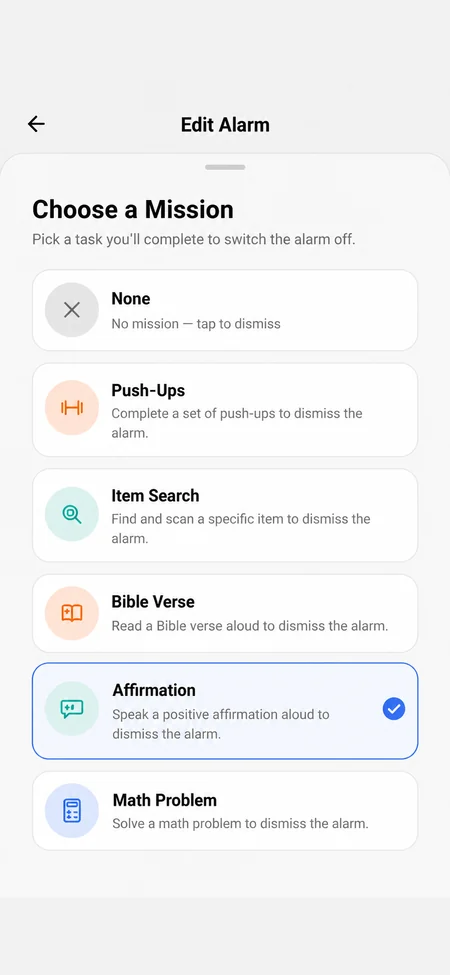
Wekup mission picker with Math Problem selected, listed with Push-Ups, Item Search, Bible Verse and Affirmation

Why a wake up app needs a task

Silencing a normal alarm takes one tap, and you can do it asleep. A task you have to look at and finish takes enough attention to wake you properly.

Pick the mission that suits your morning

  • Push-Ups or Item Search to get out of bed.
  • Math Problem when you can't use the camera or are in a shared room.
  • Affirmation or Bible Verse to start the day with words worth reading aloud.

Set it up the night before

Choose the time and mission, and Wekup asks for alarm, camera and microphone permissions when you save, so nothing interrupts the morning. Wekup also sends a reminder at 9 PM if you have not set an alarm yet.
Questions

Questions people ask

That is who it was built for. A mission alarm keeps ringing until the mission is complete, with no snooze button.

Still stuck? Email us and a human will get back to you.

Tomorrow morning starts tonight

Set one alarm and pick one mission before bed. Then find out what you do with the time you used to snooze away.

Get it onGoogle PlayComing soonApp Store

Free to download · First mission wake-up free · No account needed

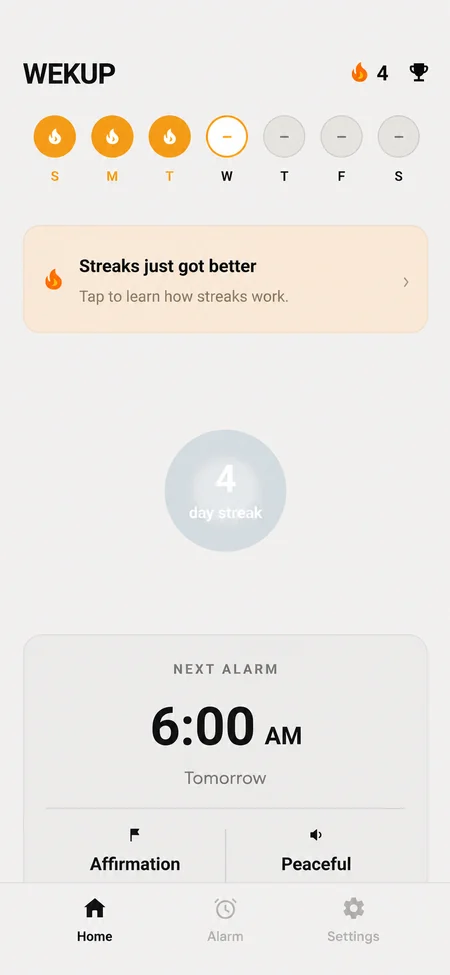
Wekup home screen with the next alarm set for 6:30 AM with a Math Problem mission, the free wake-up counter and the weekly streak row